DLUX Founder's Set NFT

Announcing DLUX Founder's Set
Today after a lot of work we pushed our NFT Smart Contracts to the DLUX ecosystem for alpha testing. Our Snapshot is complete and all accounts with over 100 DLUX will receive a DLUX Founder's Set Mint Token.
My last several blog posts have talked about NFTs and what I hope to bring the Hive's Layer 2. Today our network of node runners adopted a massive HardFork and are currently in a "simmer" phase to ensure that all the normal things we love about DLUX are still functioning well. Over the next several days there will be a series of smaller changes that slowly open the new smart contracts abilities to Define, Mint, Transfer, Airdrop, Auction, and Sell our new NFTs.
So what are these's NFTs?
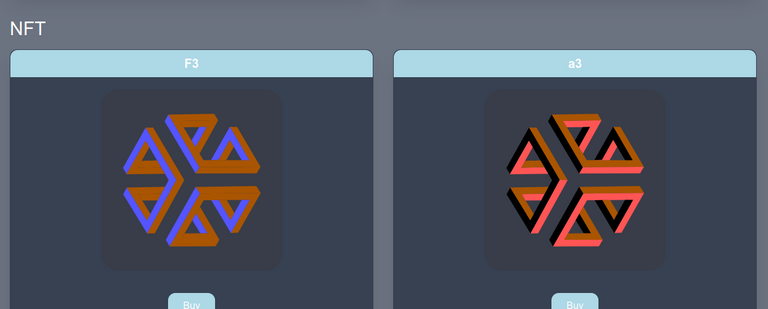
This set includes all 4096 possible combinations of the standard 16 color palette applied to our current DLUX logo. When you receive a Mint Token you can "unwrap" it to claim one of the combinations using random enough numbers intrinsic to the Hive blockchain. Once minted you will be able to sell, auction, give, or destroy the NFT.
One thing we haven't talked about yet is an "intrinsic value." When we mint our token we will be putting 100 DLUX in each token from our main @dlux-io account. And if the NFT is ever destroyed by it's owner 100 DLUX will be placed in their account. You can think of it like a melt value.
Once testing is complete we plan on porting these smart contracts to our community token starter kit so you can all generate NFTs between yourselves basically at cost.
The permlink for this post will be part of the NFT defintion, stand by over the coming week as our features are tested.
Content of set script QmcxXKkAQoN9vNBdpm88VUj81fvvWR7ySkjryxdNejBRnY:
<!DOCTYPE html>
//<html><head><script>
function compile (message, display) {
const colors = ['#000000', '#AA0000', '#00AA00', '#AA5500', '#0000AA', '#AA00AA', '#00AAAA', '#AAAAAA', '#555555', '#FF5555', '#55FF55', '#FFFF55', '#5555FF', '#FF55FF', '#55FFFF', '#FFFFFF']
const Base64 = {
    _Rixits :
    "0123456789ABCDEFGHIJKLMNOPQRSTUVWXYZabcdefghijklmnopqrstuvwxyz+=",
    toFlags : function (rixits) {
        var result = []
        rixits = rixits.split('');
        for (j = 0; j < rixits.length; j++) {
            for (var i = 32; i >= 1; i = i/2){
                if (this._Rixits.indexOf(rixits[j]) >= i){
                    result.unshift(1)
                    rixits[j] = this._Rixits[this._Rixits.indexOf(rixits[j]) - i]
                } else {
                    result.unshift(0)
                }
            }
        }
        return result
    }
}
        const flags = Base64.toFlags(message)
        var uColors = []
        var picker = 0
        for(var i = 0; i < 3; i++){
            for(var j = 0; j < 4; j++){
                if(flags[i*4 + j]){
                    picker += Math.pow(2,j)
                }
            }
            uColors.push(colors[picker])
            picker = 0
        }
        const SVG = '<svg id="Layer_1" data-name="Layer 1" xmlns="http://www.w3.org/2000/svg" viewBox="0 0 333 333"><defs><style>.cls-1{fill:#393d49;}.cls-2' + uColors[0].replace('#', '') + '{fill:' + uColors[0] + ';}.cls-3' + uColors[1].replace('#', '') + '{fill:' + uColors[1] + ';}.cls-4' + uColors[2].replace('#', '') + '{fill:' + uColors[2] + ';}</style></defs><rect class="cls-1" width="333" height="333" rx="33.3"/><polygon class="cls-2' + uColors[0].replace('#', '') + '" points="180.51 142.86 180.22 142.86 123.17 46.14 207.53 44.57 214.82 56.49 144.19 57.9 151.11 69.33 165.81 93.63 180.52 117.94 187.66 129.75 201.54 129.74 229.98 129.74 257.94 129.74 271.94 129.74 236.41 68.54 249.57 68.67 292.68 142.08 180.51 142.86"/><polygon class="cls-3' + uColors[1].replace('#', '') + '" points="123.17 46.14 180.22 142.86 180.51 142.86 173.73 154.38 173.48 154.38 116.46 58.51 123.17 46.14"/><polygon class="cls-4' + uColors[2].replace('#', '') + '" points="180.06 68.94 151.11 69.33 144.19 57.9 214.82 56.49 180.52 117.94 173.07 105.61 193.51 68.76 180.11 68.94 180.06 68.94"/><polygon class="cls-2' + uColors[0].replace('#', '') + '" points="81.49 69.81 95.22 69.9 152.32 166.28 137.95 166.24 81.49 69.81"/><polygon class="cls-3' + uColors[1].replace('#', '') + '" points="103.73 203.78 117.29 178.81 123.88 166.69 116.86 154.7 102.5 130.16 88.38 106.03 81.31 93.94 46.42 155.51 39.89 144.09 81.49 69.81 137.95 166.24 84.27 264.56 40.32 192.55 46.93 180.23 83.81 240.48 90.18 228.75 103.73 203.78"/><polygon class="cls-3' + uColors[1].replace('#', '') + '" points="180.11 68.94 193.51 68.76 173.07 105.61 180.52 117.94 165.81 93.63 180.06 68.94 180.11 68.94"/><polygon class="cls-3' + uColors[1].replace('#', '') + '" points="201.54 129.53 236.29 68.47 236.41 68.54 271.94 129.74 257.94 129.74 257.94 129.68 243.57 105.23 236.13 92.56 215.68 129.32 201.54 129.53"/><polygon class="cls-4' + uColors[2].replace('#', '') + '" points="81.31 93.94 88.38 106.03 88.33 106.06 74.48 130.81 67.31 143.63 109.36 142.71 116.68 154.81 46.42 155.66 46.42 155.51 81.31 93.94"/><polygon class="cls-4' + uColors[2].replace('#', '') + '" points="236.13 92.56 243.57 105.23 243.35 105.36 229.98 129.25 229.98 129.74 201.54 129.74 201.54 129.53 215.68 129.32 236.13 92.56"/><polygon class="cls-2' + uColors[0].replace('#', '') + '" points="102.5 130.16 116.86 154.7 116.68 154.81 109.36 142.71 67.31 143.63 74.48 130.81 74.71 130.93 102.07 130.41 102.5 130.16"/><polygon class="cls-4' + uColors[2].replace('#', '') + '" points="173.73 154.38 180.51 142.86 292.68 142.08 285.67 153.89 173.73 154.38"/><polygon class="cls-4' + uColors[2].replace('#', '') + '" points="137.95 166.24 152.32 166.28 152.47 166.52 98.34 264.11 84.27 264.56 137.95 166.24"/><polygon class="cls-2' + uColors[0].replace('#', '') + '" points="75.22 203.95 90.18 228.75 83.81 240.48 46.93 180.23 117.29 178.81 110.41 191.47 68.27 192.43 75.2 203.91 75.22 203.95"/><polygon class="cls-4' + uColors[2].replace('#', '') + '" points="117.29 178.81 103.73 203.78 75.22 203.95 75.2 203.91 68.27 192.43 110.41 191.47 117.29 178.81"/><polygon class="cls-2' + uColors[0].replace('#', '') + '" points="173.73 178.97 284.69 177.27 293.11 190.05 181.29 191.19 173.73 178.97 173.73 178.97"/><polygon class="cls-3' + uColors[1].replace('#', '') + '" points="173.45 178.98 173.73 178.97 173.73 178.97 181.29 191.19 125.66 288.43 118.67 276.21 173.45 178.98"/><polygon class="cls-4' + uColors[2].replace('#', '') + '" points="230.69 203.13 216.31 203.23 202.17 203.32 188.28 203.42 181.41 215.38 167.24 240.01 153.07 264.63 146.42 276.21 217.06 276.06 210.03 288.14 125.66 288.43 181.29 191.19 293.11 190.05 251.53 263.12 238.38 263.54 272.65 202.84 257.89 202.95 230.69 203.13"/><polygon class="cls-3' + uColors[1].replace('#', '') + '" points="202.17 203.32 216.31 203.23 237.56 239.53 244.7 226.68 257.89 202.95 272.65 202.84 238.38 263.54 238.25 263.61 202.17 203.32"/><polygon class="cls-2' + uColors[0].replace('#', '') + '" points="216.31 203.23 230.69 203.13 244.5 226.57 244.7 226.68 237.56 239.53 216.31 203.23"/><polygon class="cls-3' + uColors[1].replace('#', '') + '" points="167.24 240.01 181.41 215.38 174.24 227.88 195.49 264.27 182.08 264.38 182.03 264.38 167.24 240.01"/><polygon class="cls-2' + uColors[0].replace('#', '') + '" points="182.03 264.38 182.08 264.38 195.49 264.27 174.24 227.88 181.41 215.38 217.06 276.06 146.42 276.21 153.07 264.63 182.03 264.38"/></svg>'

        if(display){
            document.getElementById('body').innerHTML = SVG
        } else {
            return {HTML:SVG, attributes:[{name:'Color 1', value: uColors[0]},{name:'Color 2', value: uColors[1]},{name:'Color 3', value: uColors[2]}], sealed:''}
        }

}
//</script>
/*
//<script>
if (window.addEventListener) {
    window.addEventListener("message", onMessage, false);
    }
    else if (window.attachEvent) {
    window.attachEvent("onmessage", onMessage, false);
    }
    function onMessage(event) {
    var data = event.data;
    if (typeof(window[data.func]) == "function") {
    const got = window[data.func].call(null, data.message);
    window.parent.postMessage({
        'func': 'compiled',
        'message': got
        }, "*");
    }
    }
function onLoad(id){
    window.parent.postMessage({
        'func': 'loaded',
        'message': id
        }, "*");
}
//</script>
*/
//</head>
//<body id="body">Append ?NFT_UID to the address bar to see that NFT. "...html?A6"<script>const uid = location.href.split('?')[1]; if(uid){compile(uid, true)}else{onLoad(uid)}</script></body></html>
Can I get swoop 100 dlux rite now and get in on the action lol 😆
Sorry, we announced the snap shot a while ago... before we announced the 100 DLUX melt value. :p
ooooh kayyyy haha :) I still luv you!
This is awesome! I'm a DLUX holder with over 5K tokens so I'm looking forward to receiving a DLUX Founder's Set Mint Token. Thanks for your work on this project!
Nice to see you here on the DLUX platform! 😎 !DIY
You can query your personal balance by
!DIYSTATS"Once testing is complete we plan on porting these smart contracts to our community token starter kit so you can all generate NFTs between yourselves basically at cost."
Fucking finally.
Dlux is the best project I'm glad you are the one automating decentralized Hive nft minting. You are the one. You really are the Neo of the Hive blockchain 😂
You've been here before
https://twitter.com/HiveTrending/status/1447671122460241921
The rewards earned on this comment will go directly to the person sharing the post on Twitter as long as they are registered with @poshtoken. Sign up at https://hiveposh.com.
where does one get dlux?
dlux.io
@disregardfiat! The Hive.Pizza team manually curated this post.
Learn more at https://hive.pizza.
Awesome!
Is there any other place where we can see how much DLUX token I have ? And DLUX should also integrate with Hivesigner, right now, the only way I can log in is through using Hive Keychain, which is a browser extension and I cannot install that.
Awesome, I just checked and had token over 100 SO feels great. I was not following recent updates but would be looking into this mare later. Thank you for your innovation.
“When we mint our token we will be putting 100 DLUX in each token from our main @dlux-io account. And if the NFT is ever destroyed by it's owner 100 DLUX will be placed in their account. You can think of it like a melt value.“
How’s that done? I’d love to use a mechanism like that to create crypto bound NFTs with real life items as representing counterparts.
Why Dlux.io want my active key to sign up?
Almost every action on dlux.io requires an active key. From posting application content which will run on your users computer, to trading tokens.
Too bad.
You know we never get your key... you just prove you have it.